
Articles / 2014-03-24
Take Control of Your Internet
This article was originally written in Turkish and translated with the help of artificial intelligence.
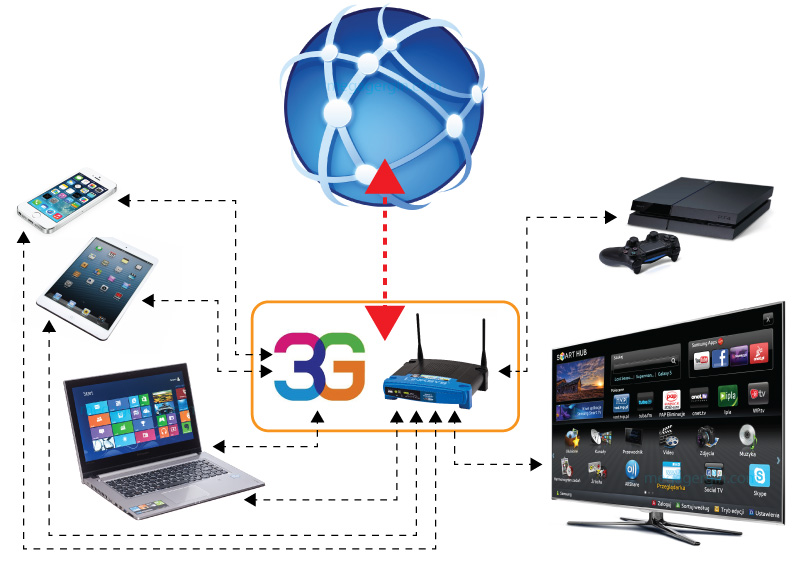
The internet is now part of your life. From your mobile phone to your television, many of the electronic devices you use all the time access the internet. Whether you realise it or not, all these devices share certain information about you with other people and organisations. You might prefer your belongings to engage in social sharing rather than be antisocial objects. But that information may also cover things you would not really want to share.
With that in mind, you may want to remain anonymous. When anonymous internet use is mentioned, illegal activities are usually the first thing that comes to mind. Yet the following situations can apply to many of us:
- Your workplace may have measures restricting web browsing.
- You may want to express your own views freely online and dislike being censored by others.
- You may be unhappy about search engines and advertisers collecting information about you.
- A foreign country you visit may restrict access to the places you normally use online.
- One day your government may restrict your internet, thinking it knows better than you what is good or harmful for you.
- You may have let yourself become a little paranoid.
Every device connected to the internet receives a unique IP address. This may change each time you connect or remain fixed; either way, during that period it belongs only to the device you are using. This is what enables data your device requests from the internet to reach it. An IP address does not mean much on its own. It can reveal your country or city, but your internet service provider (ISP) has to record these IP addresses, and matching them against its customer database makes information such as your name, address and telephone number easy to obtain. ISPs do not share this information with just anyone, but they must share it when legally authorised bodies request it. They may also share all or some of it for profit, not only when obliged to do so. Have you never wondered how personalised advertisements or announcements bearing your name can arrive on your phone or in your email?
Another way of collecting information is through cookies. When you visit a website, its server sends your browser a small text file to store. Many of the things you do on that site can then be recorded through this file: your passwords, credit card information, which pages you viewed and so on. The actual aim here is to save you time and provide a better service. At this point, alongside the cookies from the site you are visiting, third-party cookies from other sites that have placed advertisements there, and in which you may have no interest at all, are also stored on your device. The problem generally arises with these third-party cookies, because you know nothing about the people storing information about you.
There are many other points at which you are recorded. Search engines record searches made using your IP address. Google, for example, keeps this data for nine months, meaning that if you search for your home or workplace on Google, this information will also be retained for nine months. If you are now sufficiently suspicious, let's look at legal ways to avoid being recorded.
When you want to visit a web page from your device, it tells the ISP it is connected to (TTnet, SuperOnline, Turkcell, Avea, Vodafone and so on) that it wants this page. This request is sent to a DNS server, where page names are matched to IP addresses. Only after receiving the reply can your device access the data for the page you want. Most ISPs use their own DNS servers, configured according to the laws of the country in which they are physically located. The easiest way to block access to an internet address is to delete its DNS record or redirect it to another address. This is also the most commonly used technique in our country. For example, if you want to reach an address blocked in your country, using a DNS server in another country can allow you to access it easily.
IP addresses of some relatively trustworthy public DNS servers:
-
Google
- 8.8.8.8
- 8.8.4.4
-
Open
- 208.67.222.222
- 208.67.220.220
-
Norton
- 198.153.192.1
- 198.153.194.1
-
Uydunet
- 62.248.80.161
- 62.248.80.162
-
Dnsadvantage
- 156.154.70.1
- 156.154.71.1
-
ScrubIt
- 67.138.54.100
- 207.225.209.66
-
Verizon
- 4.2.2.1
- 4.2.2.2
- 4.2.2.3
- 4.2.2.4
- 4.2.2.5
- 4.2.2.6
The second solution we will consider is proxy servers, or more precisely anonymous proxy servers. These servers sit between your device and the internet, and you make all your requests through them. In effect, you appear to be connecting to the internet from wherever the proxy server you use is physically located. For example, you can easily reach content blocked in your country through a proxy server in another country. It is very important to be careful here. Connecting through an unknown proxy could put all your information in someone else's hands. I recommend choosing only trustworthy proxy-service companies with a clear privacy agreement. My advice is to stay away from free proxy servers.
The final method I will discuss here, and in my opinion the safest, is a VPN (Virtual Private Network). You can create a private, encrypted tunnel between the device you use to access the internet and another VPN server anywhere in the world. This means that even your ISP cannot know what data you receive or where it comes from, and you appear to access the internet from your chosen VPN server. Again, choose highly trustworthy companies that keep no logs and have a clear privacy policy. A free VPN is acceptable only as something described as a trial period. Just as with a proxy server, ask yourself: "Why would a stranger give you a service costing thousands of dollars for free?"
With both proxy and VPN services, the physical location from which you receive the service matters. Someone living in Turkey who buys such a service from America, for example, may slow down their internet. In general, it helps to choose servers that do not require too many hops to the internet services you use. Let's explain this idea of a hop. When you want to visit a web page from your device, your device asks your ISP, which asks the DNS server which server hosts the page in question. It cannot directly reach the IP address it receives in reply; intermediate points are used to get there, and each such point is called a hop.
For example,

a SuperOnline fibre internet user in Istanbul makes a total of 18 hops to reach twitter.com and spends approximately 42 seconds doing so (or, more accurately, querying those hops).
You can buy proxy and VPN services from companies providing them, or obtain server hosting or rental abroad yourself and install server software offering the service you want. There is free software, particularly based on Linux SSH, that can meet all your needs. If you are not knowledgeable about these matters, there are also companies that will install and configure this software for you and hand it over ready to use. Perhaps a few friends could get together and try a solution like this. One important point to remember at this stage is that all internet traffic will pass through this virtual server; do not overlook that when calculating your bandwidth.
I am adding a small update here to answer your questions. Personally, I do not use a proxy server. I have tried two VPN services: Hotspot Shield, familiar to iOS users, and Private Internet Access. Hotspot Shield has a nice feature that automatically reconnects. iOS devices disconnect the VPN whenever the screen lock activates to extend battery life. When you turn the device on again, you have to reconnect manually. Despite that useful feature, I found it slow, so I switched to Private Internet Access. It lets you connect from five devices simultaneously, which was just enough for me. :) Its speed seems good for now, but frankly I am tired of connecting manually on iOS devices. Let me also list some VPN-service companies with servers in Europe that I have heard of but have no personal experience with:
- AirVPN, $9 per month, iOS compatible
- avast! SecureLine VPN, $7.99 per month
- CyberGhost VPN, €4.99 per month, iOS compatible
- Hotspot Shield, $2.99 per month, iOS compatible
- Invisible Browsing VPN, $7.95 per month, iOS compatible
- Private Internet Access, $6.95 per month, iOS compatible
- VPN Express, $2.99 per month, iOS compatible
Enjoy your anonymous internet. While doing so, do not break the laws of the country you are in. Do not then come to me saying, "This fellow wrote these things here"; I will deny knowing you. Everything I have described here consists of services that comply with today's laws and that you can buy or use free of charge. The organisations and companies concerned will present their own service agreements for you to sign. How, for what purpose and where you use these services is entirely your own decision; it is no concern of mine or anyone else's.